Features
Magica works on iPhone and Android. Features marked iOS or Android are available only on that platform.
Using an Android phone? See Magica for Android
100% Privacy: Your Trips Stay on Your Phone
While most mileage trackers upload your location history to their servers, Magica keeps it on your phone. No cloud storage. No data mining. No server of mine receiving your trips. Your client addresses, frequent routes, and business locations stay exactly where they belong - on YOUR device. It's not just a privacy policy, it's my architecture. GDPR-compliant by design, not by promise.

Detects when you're driving
Using your phone's motion sensors and your car's Bluetooth, Magica can automatically recognize when you're driving your car and when you've stopped. This allows you to use the application without having to open it.
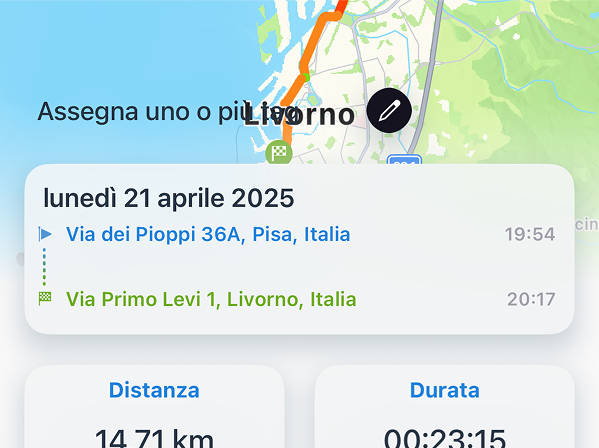
Classify your trips
You can classify your routes as "Work", "Vacation", or anything you prefer, to find and export them quickly. Intelligent and automatic. And with a swipe left or right in the list you classify a trip in a single gesture: you choose which tag goes on each side.
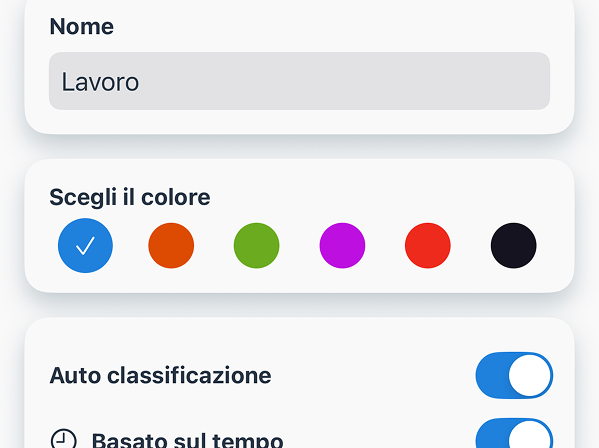
Classify many trips at once iOS
Got a week of trips to classify? Open them all on one screen, tap the right tag on each one and confirm them with a single button.
Fueling, charging and consumption
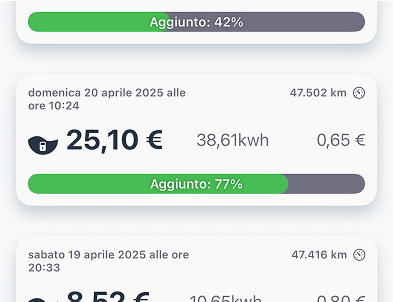
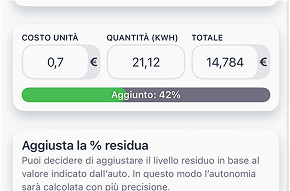
Say goodbye to receipts. With Magica, you can record all your fuel-ups or charges. For each refill, costs per unit, quantity, and total expense are analyzed. You can discover how much distance you travel per refill or charge and your average consumption.
Read the pump display iOS
At the pump, point the camera at the pump display or the receipt and Magica reads the litres, the price and the total for you: two numbers out of three are enough to complete the refuel. The camera reads the odometer too.
Manage deadlines and maintenance
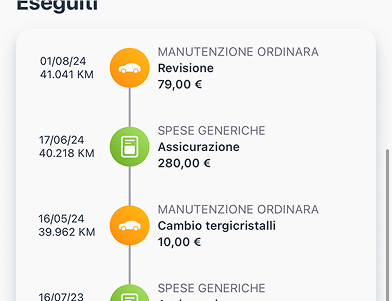
The deadlines and maintenance section allows you to easily manage every deadline for your car. For example, insurance, road tax, service checks, and inspections, but also routine maintenance such as tire rotation or oil changes. You'll be able to track all the management costs of your vehicles.
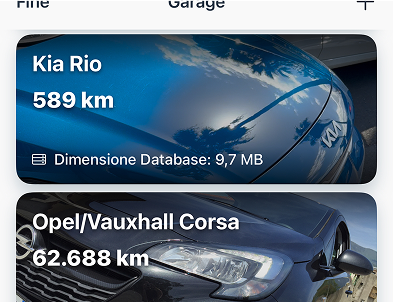
A garage with all your vehicles
You can add as many vehicles as you want. Magica's garage has no limits - add and manage all the vehicles you desire.
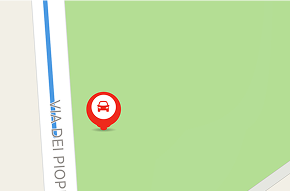
Always knows where you parked
Magica always knows where you left your car. Thanks to the Find My Car feature, you'll never waste time looking for it in those huge parking lots again.
Keep track of all your trips
Magica tracks your journeys, analyzes them, and calculates all data in detail: distance, travel time, average and maximum speed, CO2 emissions, altitude, consumption, costs, driving style, and weather. You can also add mileage costs, toll costs, and personal notes.
Photos and documents on trips
Attach the photos and PDFs that belong to a trip: the parking receipt, the ferry ticket, the client's invoice. Services work the same way, so the oil change keeps its invoice next to it. They stay on your phone, with everything else.
Support for electric vehicles
Magica is perfect for electric vehicles. It offers a map of charging stations worldwide thanks to Open Charge Map, and the charging panel has been specifically designed for this type of vehicle.
Supporting those who work
Need to submit fuel records? No worries! You can add mileage costs and toll costs, and Magica will calculate your trips for you. You can download a PDF or CSV summary and submit it to your employer or accountant. With Magica, you can easily manage your company fleet.

Rate management
If you don't want to or can't enter refueling or charging data, you can always manage the rates of gas stations or charging points. This way, Magica can calculate the costs of your vehicles in real-time.
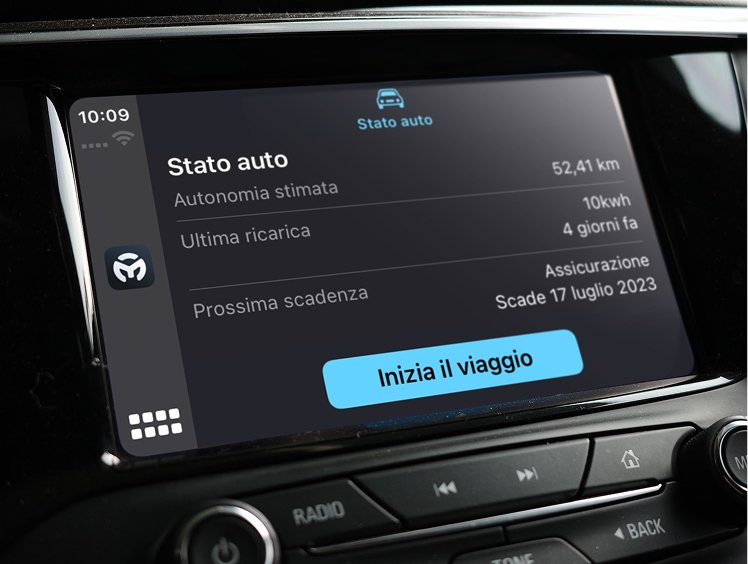
CarPlay support iOS
Magica is compatible with CarPlay and offers an app to use with your car's screen. Just connect your iPhone to CarPlay via USB cable or WiFi, and you can manage your car directly from the car's screen. Start a trip, automatically classify it, check the status of your vehicle, and see the map of the fuel stations or charging points around you.
Android Auto support Android
On your car's screen Magica shows nearby charging stations (and, in Italy, fuel stations with prices) with connectors, prices and navigation, plus the range left in each tank. It can also start a trip on its own when you connect your phone to Android Auto. Available from version 3.1.
Sync between devices
Is the car used by more than one person? No problem! You can sync data between two devices on the same Wi-Fi network, even between an iPhone and an Android phone: Magica only sends what is missing.
Efficiency analysis iOS
Magica analyzes your car's efficiency through all the recorded data and notifies you when something isn't right, with useful tips to improve efficiency.
Complete statistics
General, trip, refuel and service statistics: how much you drive, how much you use, what your vehicle really costs you, month by month and year by year.
Automatic classification
Tags and automatic classification! For each tag, you can define a time frame and one or more days of the week, and Magica will automatically classify your trips.
Recognizes when you're refueling or charging iOS
When you're at a gas station or a charging point, Magica will understand and automatically ask for refueling or charging information. Additionally, Magica monitors consumption and will automatically notify you when it's necessary to refuel or recharge.
Smart refueling
Magica manages refueling for combustion engine cars intelligently. You can add a partial refill or a full tank, and the data will be calculated to always give you the right information. If your car is hybrid, you can decide which of the two fuels to refill. If you always refuel at the same levels, Magica will be able to determine costs and consumption very accurately.
Bi-fuel cars: two tanks
Driving a petrol and LPG car, or petrol and CNG? Magica keeps the two tanks apart: refuels, consumption and range for each fuel, without mixing up the numbers.
Range and next refuel
Magica estimates how far you can still go on the fuel or charge you have and when you'll need the next refuel, based on your real consumption and the trips you make.
Manage your vehicle
Add your vehicle, no matter what type. If you can't find the make or model in the list, create it from scratch - you just need to add the technical data of the engine size, consumption, and emissions.
Export all your trips
You can export your trip data with a simple tap. Choose the month or period you want and tap on the icon at the top right, choose between PDF and CSV format and save your data.
Export your refueling or charging data
Do you have a business and need to download fuel cards? You can export refueling or charging data from Magica. Choose the month or period you want, export to CSV (on iPhone also to PDF) and save your data.
Merge trips
A journey is always pleasant, but stops are mandatory. Now you can merge trips! Make as many stops as you want and then merge the split journeys to end up with a beautiful complete route!
Move, copy, repeat
A trip ended up on the wrong vehicle? Move it or copy it to another one in a moment. You can also add a trip by hand, find the trips similar to the one you're looking at, and create the return trip.
Share your trips iOS
Want to share a trip on social media like Instagram or Facebook? Use the sharing feature, create an image of your trip, and share it with a tap!
Import data from CSV iOS
Coming from another app? No problem! Import your data from a CSV file and choose what each column means.
Magica takes care of your children iOS
With Baby Safety, Magica helps you not to forget the most important thing - your children. When you finish driving, you'll receive a notification reminding you who's traveling with you, including the little ones.
Languages and units of measurement
You can change units of measurement and currency at any time — and on iPhone, the app language too.
Export and import trips
You can export and import trips individually. This makes it easier to transfer them to other devices.
Pause tracking whenever you want
Need to travel by train? Going on vacation? No problem, you can pause the tracking system, saving battery and preventing trips from being recorded by mistake.
Are you a driver? Magica is for you!
Activate Sport Mode and track your races. Magica analyzes your performance and gives you a complete report with useful information to improve.
Electric Charging Station Map
Map of charging points in your area and nearby, showing availability status and connector types. Powered by OpenChargeMap.
Fuel station map
A map of the fuel stations around you with their fuel prices, so you can spot the cheapest one at a glance. Available in Italy; on iPhone also as a widget.
Speed cameras on the map
See the speed cameras around you on the map. On iPhone, if you turn on alerts, Magica warns you when you're approaching one during a trip, on the CarPlay screen too. Available in Italy.
AI and CRM integration
Magica now exposes an API server and an MCP endpoint. Connect your data to your favorite AI assistant or CRM and manage it in plain language.
Live Activities on iPhone and CarPlay iOS
Follow your trip data in real time on the iPhone Lock Screen and in the Dynamic Island, and on your car's display with CarPlay. Hands free, eyes on the road.
Widgets, Apple Watch and Siri iOS
Eight widgets, Control Center included, to keep Magica within reach. On Apple Watch you see whether you're driving, start or stop a trip, switch vehicle and check range and costs. With Siri and Shortcuts you start tracking by voice or from an automation.
Voice commands
Talk to Magica to log a refuel, set a service or update the odometer. You can also ask questions like "how much does my car consume?", "how many km did I drive this month?" or "what are my upcoming services?".
EV route planner
For EV drivers: plan your trips with charging-station optimization along the route. Always know where to recharge.
Professional financial reports
Generate complete reports for business expenses, tax deductions and mileage reimbursements. Export detailed PDF and CSV ready for your accountant or employer — IRS-compliant and professionally formatted.
Trip Dossier in PDF
Beyond the reports, Magica builds the Trip Dossier: a PDF with the list of the period's trips and, for each one, the route map and its attachments. One document you can hand over as it is.
Auto-switch between vehicles iOS
If you use tracking via Bluetooth Audio, BLE or iBeacon across multiple vehicles, Magica automatically recognizes which vehicle is connected and switches the active vehicle for you. (In beta, not compatible with CarPlay)
Odometer history
See when and how the odometer value has been updated. Generate statistics based on odometer trends over time.
Export trips in GPX and KML iOS
Beyond PDF and CSV, you can now export your trips in GPX and KML formats — compatible with mapping and fitness software.
Smart service scheduling
Set recurring maintenance alerts based on mileage intervals. Never miss an oil change, tire rotation or scheduled service.
Map of all your trips iOS
You can now view a map of all your trips directly from the trip list. Location-based classification tags also support a custom radius from 100m to 4km.
