Mileage Tracker for Android: Automatic Trip Logging That Stays on Your Phone
Magica records every drive on its own and looks after the rest of your car: fuel, costs, maintenance, renewals and mileage reimbursement. There's no account to create and no cloud of mine where your trips end up: everything stays on your Android phone.
- Trips logged automatically, from your phone's motion or your car's Bluetooth
- Business or personal, sorted by day and time
- PDF and CSV mileage reports
- Syncs with iPhone over Wi-Fi, with no server in between

Free download · Premium with a monthly or yearly plan, or a one-time lifetime purchase
Have an iPhone? Get Magica on the App Store →
How Magica Tracks Your Mileage on Android
Add your car once, then just drive.
Every drive, recorded on its own
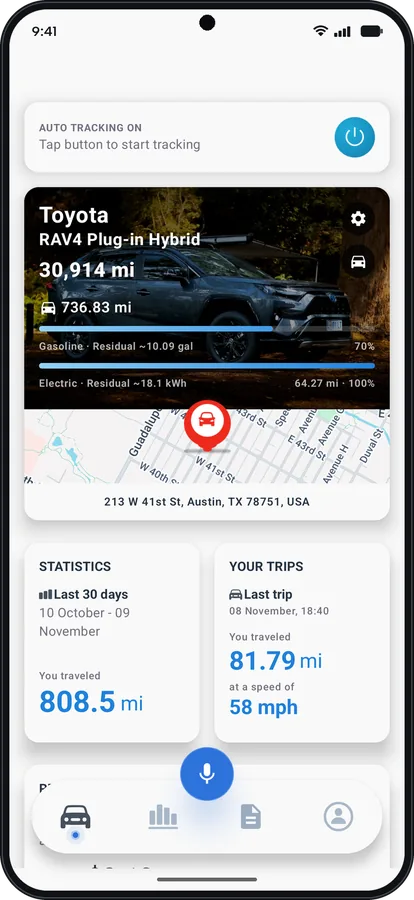
Magica notices when you start driving from your phone's motion or your car's Bluetooth, and records the trip: route, distance, duration, cost, weather and elevation.
Business or personal, sorted by day and time
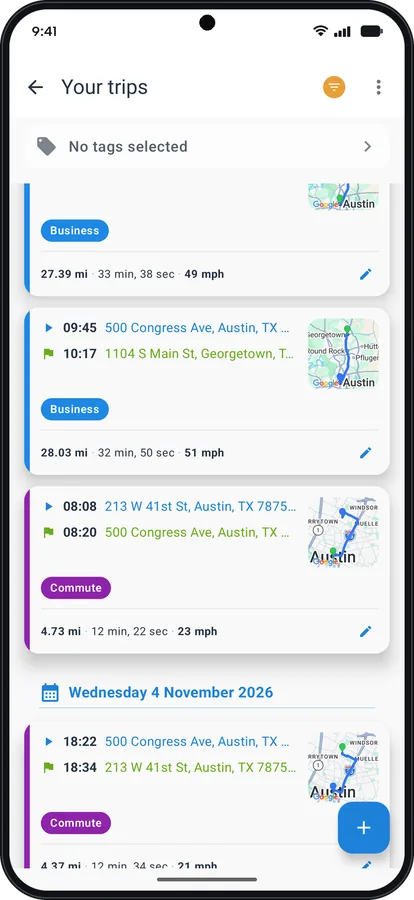
Classify a trip with one swipe, or set rules and let Magica do it: weekdays from 9 to 6 are Business, weekends are Personal. Rules can also use the place you leave from or arrive at.
- Your own categories next to Business and Personal
- Merge split trips, add a forgotten one, create the return trip with one tap
- Pause tracking when you don't need it
Mileage deduction and reimbursement, worked out
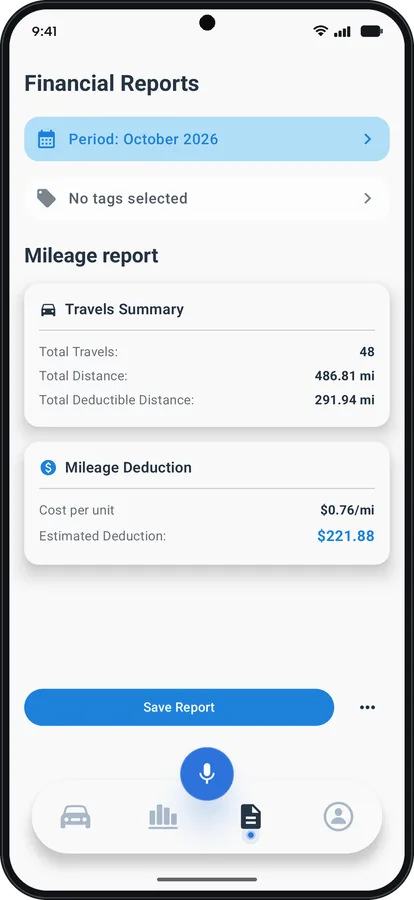
Set a rate for each vehicle, such as the IRS standard mileage rate or the one your employer pays, and Magica works out the value of every business mile. The PDF or CSV report is ready for your accountant, your employer or your tax return.
- A monthly report to save and share
- A PDF dossier for each vehicle
Bi-Fuel Cars and Plug-in Hybrids, Priced Right
Two tanks, one real cost per trip
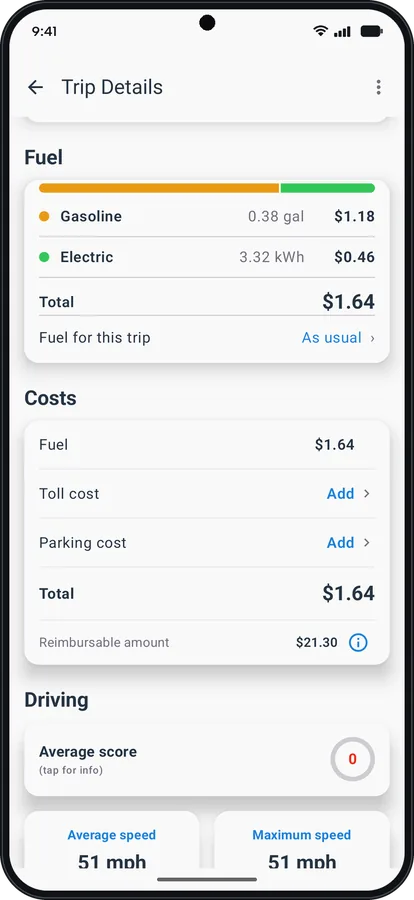
If your car runs on gas and LPG or CNG, or it's a plug-in hybrid, Magica gives it a second tank or a battery. Every trip is split between the two fuels and its cost counts both, so your cost per mile is finally the real one.
- The range left in each tank, right on the dashboard
- Real consumption for each fuel, from your fill-ups and charges
- Gas, diesel, LPG, CNG and EV charging, full or partial
Android and iPhone in the Same Household? They Sync
Magica runs on both, and the two versions sync with each other on the same Wi-Fi network, directly between the phones. Nothing goes through a server.
Android and iPhone
Share a car with someone who uses an iPhone, and the vehicle's data stays aligned on both phones.
Android and Android
The same works between two Android phones, for a family or for a work phone.
Over Wi-Fi, no server
On the same Wi-Fi network, your data travels from one device to the other with no server in between.
Your Trips Stay on Your Phone
Magica has no cloud: there's no server of mine where your trips end up.
- No account
- No shared location
- Export whenever you want
- Backup to a file you keep
You don't sign up and you don't log in. When you need your data, you export it as PDF or CSV, or you save a backup file. A few features need the internet, such as weather, maps and voice commands: the privacy policy lists every one of them. It's an architecture choice, not a marketing promise.
Maintenance and Renewals, Never Missed
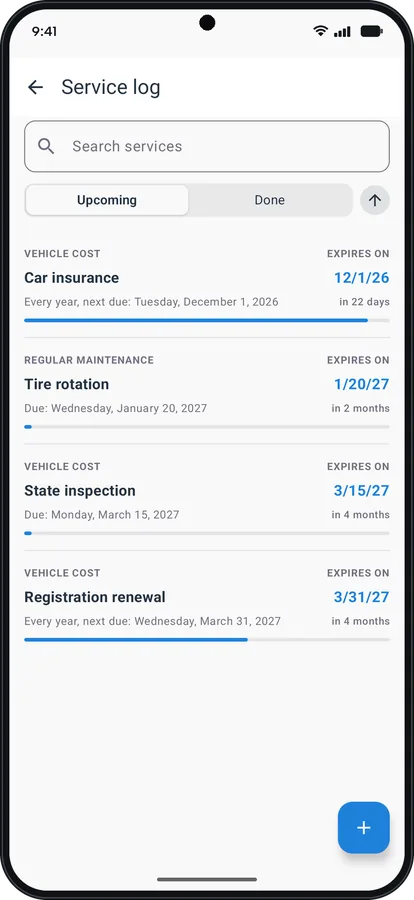
Reminders by date or by mileage
Insurance, registration, inspection, oil changes, tires: Magica reminds you on a date or after a set number of miles. Attach invoices and documents and keep the full cost history of each vehicle.
- A garage with as many vehicles as you like: cars, motorcycles, scooters, vans
- Where you parked, and what parking cost
- Odometer history
More of What Magica Does on Android
Voice commands
Log a fill-up, a service or the odometer by speaking, and ask questions about your data in your own words.
Local API and MCP (early access)
Connect your car data to Claude or another AI assistant through the API and MCP server built into the app. They work only on your local network, and you decide which apps can connect.
Fuel economy and costs
From your fill-ups and charges, Magica works out real fuel economy, cost per mile and remaining range, and predicts your next fill-up.
EV charging map
Find charging stations near you, anywhere in the world, if you drive electric or a plug-in hybrid.
Trip analysis
Average and top speed, CO2, weather, elevation and a driving score for every trip.
Miles or kilometers
Distance and volume units are set separately: miles or kilometers, gallons or liters.
Lifetime Purchase or Subscription: Your Choice
Magica is free to download. Premium features unlock in one of three ways, and Google Play shows you the price in your currency before you buy.
Monthly
Pay month by month and cancel whenever you want from Google Play.
Yearly
One payment a year, renewed automatically until you cancel.
Lifetime
Pay once and Premium stays yours on your Google account, with no renewals.
Frequently Asked Questions
Have another question? Write to me at support@magica-app.com: I answer every email myself. You can also read the full FAQ.
Start Tracking Your Mileage on Android
Install Magica, add your car and go for a drive: your trips start recording on their own.
Have an iPhone? Get Magica on the App Store →
Free download · No account · Your data stays on your phone